Setting a graphic symbol’s looping “first frame” value is kind of a pain in the butt. Well, actually it’s not hard at all. Here are the steps:
- On the stage, select the symbol instance you want to work with (if it’s not already selected)
- Make sure the “looping” section in the properties panel is expanded
- Select the “First” box in the properties panel
- Type in the frame number you want
- Hit <enter>
Not too hard, right? Well, sort of. All those steps can add up if you’re working a lot with graphic symbols, especially when you’re switching between different start frames a lot, such as when doing lip sync or when all your hand poses are inside a single symbol. It’s even worse when you don’t know which exact frame you’re looking for. Then you have to either guess the frame number or go inside the symbol to see where the pose you want is located. Bleh.
So I made some commands. I set up a system where the steps for changing the first frame of a graphic symbol are:
- On the stage, select the symbol instance you want to work with (if it’s not already selected)
- Type in the frame number you want
… and, done. You don’t even have to hit <enter>.
Even better, I made it so that if you hold down the <ctrl> key while you type in the frame number, it simultaneously switches the symbol instance to single-frame (a feature I found useful quite often).
Even more better, I made it so I can hit the plus and minus keys to increment or decrement the start frame. It’s super convenient for when you’re hunting for what frame your desired pose is on.
Even superlative better, I created another command that sets all the selected graphic symbols to start on a random frame. That’s useful when you’re reusing the same animation loop in different places on the stage but you want them to look more random by having them be at different places in their loop. For instance, I’ve done this with falling rain and blowing leaves.
That’s Crazy Talk!
But how, you may ask, does it know when you’re done typing frame number, and what if you screw up and need to type a different number? Elementary! My commands have a built-in timeout. They keep looking for additional digits to tack onto the current frame number as long as it’s been less than one second since the last number was pressed. If you let it wait for a second, you can start typing in a new number.
For instance, let’s say I select a symbol instance and I type in “43”, but then I realize that I made a type and I actually wanted “34”. All I need to do is wait a little more than a second to run down the timer, then I can type in “34” and everyone’s happy in the end!
Keyboard Shortcut Jiggery-Pokery
The trick with these commands, though, is that they take an end run around the normal way to define keyboard shortcuts. Normally in Flash, if you want to use a number key as part of a shortcut, you have to include the <ctrl> key. The thing I noticed, though, is that the actual keyboard shortcut file doesn’t have that same limitation. The limitation is entirely imposed in the keyboard shortcuts dialog.
A little bit of hacking later and I figured out the shortcut file format. With a little ingenuity I was able to rig it all up as I described above. If you want to have this setup too then you’ll need to manually edit your keyboard shortcut file as well.
One Small Caveat
The only weirdness I’ve ever run into in years of using this system is that it seems to screw up the use of the number keys in the preferences dialog (accessed through the Edit menu). There are a few possible ways of dealing with this:
- Set your preferences while the default shortcuts are activated, then switch back to your custom shortcuts.
- If you need to enter a number in the Preferences dialog, just type it in another program and then copy and paste.
- Assign shortcuts only to one set of number keys – either the ones above the letter keys on the keyboard, or the numeric keypad.
For years I’ve used these shortcuts without noticing the Preferences dialog problem – I suppose because it’s rare that I need to change numerical preferences for Flash. I think I’ve realized, though, that I only ever use these shortcuts on the numeric keypad, so my preferred solution is to only assign to those keys.
And Now the Actual Instructions
The first thing to do is to download and install the Set Frame commands:
 Set Frame Tools
The next thing you need to do is have a custom shortcuts file. If you’ve never set a custom shortcut then you probably don’t have one yet. To get a custom shortcuts file, go to the Edit menu and select ""Keyboard Shortcuts”. In the dialog that comes up, hit the “Duplicate Set” button, just to the right of the topmost dropdown box that’s labeled “Current set”:
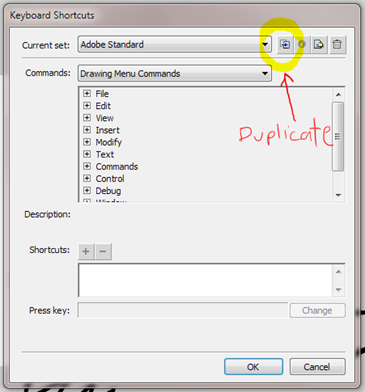
Select a name for your custom shortcuts. Mine are simply called “David’s Flash CS4”. Hit OK and then exit Flash.
Next you’ll need to open your shortcuts file in a text editor. In Windows, Notepad will do fine. I’m not a Mac person so I’m no sure what you’d use on a Mac. According to Adobe, your shortcut file is located in one of these locations (change the highlighted portions based on your username, version of Flash, and language):
-
Windows® 7™:
boot driveUsersusernameAppDataLocalAdobeFlash CS6languageConfigurationKeyboard Shortcuts
-
Windows® Vista™:
boot driveUsersusernameLocal SettingsApplication DataAdobeFlash CS6languageConfigurationKeyboard Shortcuts
-
Windows XP:
boot driveDocuments and SettingsusernameLocal SettingsApplication DataAdobeFlash CS6languageConfigurationKeyboard Shortcuts
-
Mac OS® X:
Macintosh HD/Users/username/Library/Application Support/Adobe/Flash CS6/language/Configuration/Keyboard Shortcuts/
Once you’ve found your keyboard shortcuts folder you should find a file in it with the same name as your personalized shortcuts that you saved earlier. Open that file in a text editor. For instance, in my case (using CS4 in Windows 7) I’d open this file in a text editor:
C:UsersdavidAppDataLocalAdobeFlash CS4enConfigurationKeyboard ShortcutsDavid's Flash CS4.wfx
In that file you’ll find something like this:
	<KeyboardShortcuts version="1.0">
	  <Shortcut id="32782" key="70" scope="21" flags="11" />
	   ...
	  <Shortcut id="33454" key="119" scope="2" flags="9" />
	</KeyboardShortcuts>
Just before the last line (“</KeyboardShortcuts>”) you’ll need to insert some new code. To use the number keys at the top of the keyboard, insert the following:
	<Shortcut name="set fr up" key="187" scope="1" flags="1" />
	<Shortcut name="set fr down" key="189" scope="1" flags="1" />
	<Shortcut name="set fr 0" key="48" scope="1" flags="1" />
	<Shortcut name="set fr 1" key="49" scope="1" flags="1" />
	<Shortcut name="set fr 2" key="50" scope="1" flags="1" />
	<Shortcut name="set fr 3" key="51" scope="1" flags="1" />
	<Shortcut name="set fr 4" key="52" scope="1" flags="1" />
	<Shortcut name="set fr 5" key="53" scope="1" flags="1" />
	<Shortcut name="set fr 6" key="54" scope="1" flags="1" />
	<Shortcut name="set fr 7" key="55" scope="1" flags="1" />
	<Shortcut name="set fr 8" key="56" scope="1" flags="1" />
	<Shortcut name="set fr 9" key="57" scope="1" flags="1" />
	<Shortcut name="static set fr 0" key="48" scope="1" flags="9" />
	<Shortcut name="static set fr 1" key="49" scope="1" flags="9" />
	<Shortcut name="static set fr 2" key="50" scope="1" flags="9" />
	<Shortcut name="static set fr 3" key="51" scope="1" flags="9" />
	<Shortcut name="static set fr 4" key="52" scope="1" flags="9" />
	<Shortcut name="static set fr 5" key="53" scope="1" flags="9" />
	<Shortcut name="static set fr 6" key="54" scope="1" flags="9" />
	<Shortcut name="static set fr 7" key="55" scope="1" flags="9" />
	<Shortcut name="static set fr 8" key="56" scope="1" flags="9" />
	<Shortcut name="static set fr 9" key="57" scope="1" flags="9" />
To use the numeric keypad, insert the following:
	<Shortcut name="set fr up" key="107" scope="1" flags="1" />
	<Shortcut name="set fr down" key="109" scope="1" flags="1" />
	<Shortcut name="set fr 0" key="96" scope="1" flags="1" />
	<Shortcut name="set fr 1" key="97" scope="1" flags="1" />
	<Shortcut name="set fr 2" key="98" scope="1" flags="1" />
	<Shortcut name="set fr 3" key="99" scope="1" flags="1" />
	<Shortcut name="set fr 4" key="100" scope="1" flags="1" />
	<Shortcut name="set fr 5" key="101" scope="1" flags="1" />
	<Shortcut name="set fr 6" key="102" scope="1" flags="1" />
	<Shortcut name="set fr 7" key="103" scope="1" flags="1" />
	<Shortcut name="set fr 8" key="104" scope="1" flags="1" />
	<Shortcut name="set fr 9" key="105" scope="1" flags="1" />
	<Shortcut name="static set fr 0" key="96" scope="1" flags="9" />
	<Shortcut name="static set fr 1" key="97" scope="1" flags="9" />
	<Shortcut name="static set fr 2" key="98" scope="1" flags="9" />
	<Shortcut name="static set fr 3" key="99" scope="1" flags="9" />
	<Shortcut name="static set fr 4" key="100" scope="1" flags="9" />
	<Shortcut name="static set fr 5" key="101" scope="1" flags="9" />
	<Shortcut name="static set fr 6" key="102" scope="1" flags="9" />
	<Shortcut name="static set fr 7" key="103" scope="1" flags="9" />
	<Shortcut name="static set fr 8" key="104" scope="1" flags="9" />
	<Shortcut name="static set fr 9" key="105" scope="1" flags="9" />
If you’d like to use both sets of number keys, simply insert both blocks of shortcut code into your shortcuts file before the last line.
Finally, save your shortcuts file and restart Flash. Your new shortcuts should be ready to go.
Wrapping Up
In case you missed it the first time around, here’s the download link for the Set Frame tools:
Set Frame Tools
If you have any questions please let me know in the comments below or send me email.
These tools are released under the Creative Commons Attribution-Noncommercial-Sharealike 3.0 license.
 Distribution Commands
 Zero Transform installer